How to Screen & Filter Candidates
Efficiently filter, sort, and review candidate profiles to find the best talent quickly.
Reviewing Candidate Profiles
Click on any candidate row to view their detailed profile:
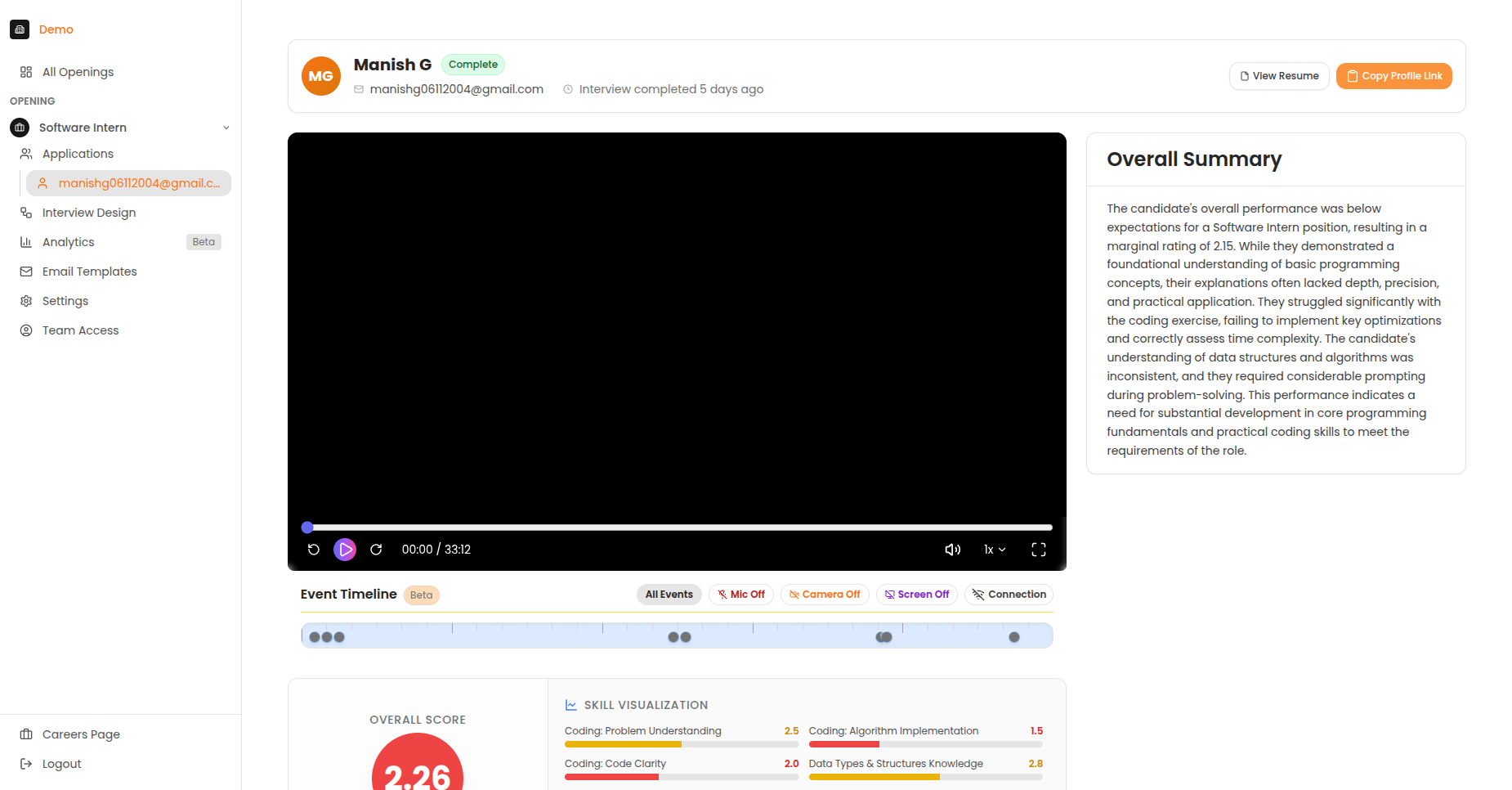
The candidate profile page showing video recording, overall score, and AI-generated summary.
Profile Components
| Section | Description |
|---|---|
| Video Recording | Full interview playback |
| Overall Score | Composite score across all criteria |
| Skill Visualisation | Radar chart of competency scores |
| AI Summary | Automated analysis of strengths and areas for improvement |
| Detailed Feedback | Section-by-section breakdown |
Full candidate profile with detailed scoring breakdown.
Efficient Review
Use the AI summary for initial screening, then watch key moments in the video for candidates you're considering advancing.
Filters
Narrow down your candidate list using filters:
| Filter | Options |
|---|---|
| Status | Invited, In Progress, Completed, etc. |
| Score Range | Min/Max AI rating |
| Date Applied | Last 7 days, 30 days, custom |
| Tags | Custom tags you've applied |
Using Multiple Filters
Combine filters to create precise searches:
- "Completed" + "Score 4+" = Top performers ready for review
- "In Progress" + "Last 7 days" = Recent active candidates
- "Invited" + "30+ days" = Candidates who may need follow-up
Sorting Options
| Sort By | Use When |
|---|---|
| AI Rating | Find top performers first |
| Date | See newest or oldest candidates |
| Status | Group by progress stage |
| Name | Alphabetical lookup |
Score Interpretation
Quickly assess candidates using the AI score:
| Score | Meaning | Recommendation |
|---|---|---|
| 4.5 - 5.0 | Exceptional | Strong hire |
| 4.0 - 4.4 | Above average | Consider for next round |
| 3.5 - 3.9 | Meets expectations | Review carefully |
| 3.0 - 3.4 | Below average | Likely not a fit |
| Below 3.0 | Below threshold | Review before advancing |
Score Context
Scores are relative to the scoring criteria you defined. A 3.5 for a senior role may indicate stronger performance than a 4.0 for an entry-level position with simpler criteria.
Quick Actions
From the candidate list, you can quickly:
| Action | How |
|---|---|
| View profile | Click candidate row |
| Send email | Click email icon |
| Add note | Click notes icon |
| Change status | Use dropdown menu |
| Add tag | Click tag icon |
Using Tags
Organise candidates with custom tags:
Creating Tags
- Select a candidate
- Click the tag icon
- Type a new tag name or select existing
- Press Enter to apply
Tag Ideas
Strong TechnicalCulture FitNeeds Follow-upReferralInternal CandidateSenior Track
Filtering by Tags
- Click the Filter button
- Select "Tags"
- Choose one or more tags
- Results update automatically
Keyboard Shortcuts
Speed up your workflow:
| Shortcut | Action |
|---|---|
↑ / ↓ |
Navigate between candidates |
Enter |
Open selected profile |
Esc |
Close profile |
Space |
Play/pause video |
← / → |
Skip 5 seconds in video |